Chrome一直大量佔用CPU
10分鐘內平均佔用70%。

Slack佔用的記憶體越來越多
1小時內增加了1.4 GB,目前為3.3 GB。

App異常警示
當某個App霸佔CPU、記憶體不斷增加,或大量佔用磁碟或網路時,瀏海中會彈出提醒,旁邊就是「結束」。
 活動監視器
活動監視器和程序檢查器,顯示CPU、GPU、記憶體、溫度、風扇、磁碟、網路和電池,每個數值背後的App、最長一年的歷史記錄、你執行的每個程式碼代理程式,以及為Claude、Codex和Cursor打造的MCP伺服器。
Google Chrome 21.23 GB  VS Code 8.17 GB
 Terminal 3.86 GB
 Safari 2.69 GB
 GitHub Desktop 427 mW Google Chrome 367 mW
 Zoom 145 mW Terminal 86 mW Google Chrome

 Google Chrome
 Photos


 Safari
 Figma 照片 Google Chrome Xcode未執行XcodeCPU 51.4% 音樂 正在播放 100% Zoom 正在播放 80% Google Chrome 正在播放 35% Slack 無聲 已靜音 Safari 無聲 100% Figma 無聲 100% Notion 無聲 100% 郵件 無聲 100%
 Claude · 9個程序Terminal · node
 Codex · pythonVisual Studio Code · nodeTerminal · node
 Cursor · nodeTerminal · pythonVisual Studio Code · nodeTerminal · 3個程序Terminal · goCursor · node
VitalsVitals本身的主題:隨Mac使用淺色或深色,每個圖表各有顏色。
試試看:每個標籤頁都能使用。數值是模擬的,因為網頁無法讀取你的Mac,也不應該讀取。
Vitals 以 App 为单位呈现数据,能够直接回答用户最关心的问题。
 少数派 Vitals評測
还蛮好用的,占用不大,界面也很好看。集成ai很方便,有时候电脑温度高了,就直接问gpt
 哒哒嘀哒嘀 少數派讀者
Now I find myself stealing quick glances at the menu bar, instead of taking another sip of coffee.
 Ed Wiseman 艾美獎得獎導演暨製作人
活動監視器會列出每一個程序。在一台正在工作的Mac上大約有一千列,其中上百列都叫Google Chrome Helper。
Vitals會把每個輔助程序算進啟動它的App。每個App只有一列、一個數值,所以「是什麼在佔用我的記憶體?」一行就能回答。
活動監視器只給程序一個名稱和一個編號。Vitals告訴你它屬於哪個App、由誰開發、從哪裡來。
拷貝、儲存為CSV,或在「終端機」中用vitals process取得相同內容。它顯示的一切。
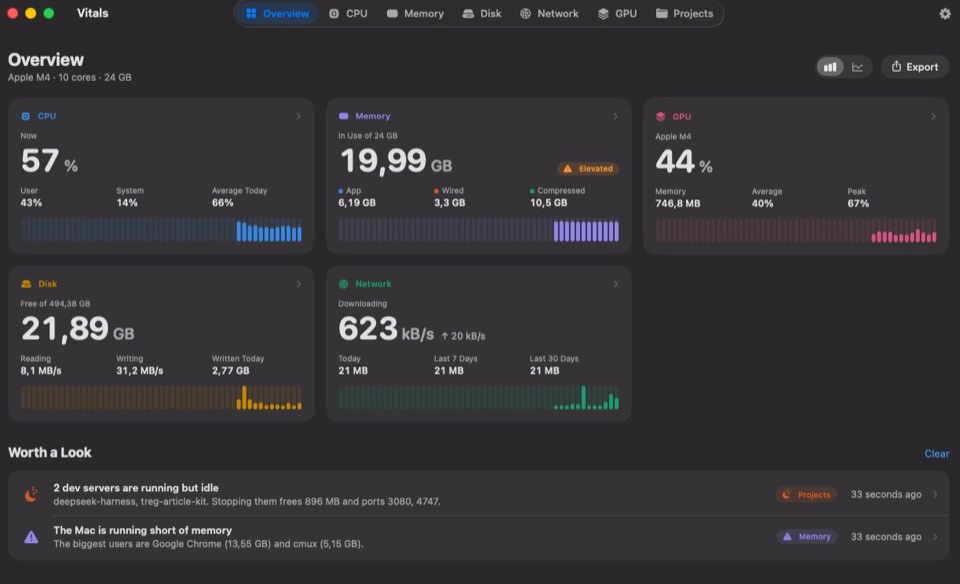
抬頭一看,就知道你的Mac在做什麼。CPU、記憶體、網路、溫度、電池等,每一項都是獨立的項目,可顯示為數字、圖表或兩者。讀數在承受壓力時會變紅,所以只有在重要時才需要看。
按一下其中一項,下拉式面板就會顯示所有數值,以及每個數值背後的App。按一下某個App,視窗就會打開並顯示它。
比較看看:最佳Mac選單列系統監控工具和最佳Mac系統監控工具。
Google Chrome – 終端機 – Safari – Google Chrome – 終端機 – Safari – Docker – Visual Studio Code – Google Chrome – Visual Studio Code – 終端機 – Safari – Docker – 照片 – Google Chrome – Docker – Visual Studio Code – Xcode – Safari – Google Chrome – Slack – Zoom – 音樂 – Figma – Google Chrome – Safari – Zoom – Visual Studio Code – Google Chrome – Zoom – Figma – Slack – Safari – 音樂 100% Zoom 80% Google Chrome 35% Slack 已靜音 試試看:沿著選單列拖移項目、選擇標籤頁,或在「聲音」標籤頁中移動滑桿。在App中,按住⌘即可拖移。
活動監視器的外觀跟你的Mac一樣。Vitals有「終端機」、「琥珀色」、「午夜色」、「梅子色」、「霓虹色」、「香檳色」、「紙張」和它本身的配色,每款都配有一種數字字體。
按一下就能設定視窗、選單列下拉式面板、「設定」和你輸出的圖片。「輔助使用」圖表顏色適用於其中任何一款。
終端機近黑底色上的螢光綠,數字使用Geist Pixel。
試試看:選一款主題,視窗隨即套用:底色、卡片、每個圖表和數字的字體。
代理程式會啟動伺服器、瀏覽器和工具伺服器,並用掉你的AI方案額度。Vitals會依專案把這一切顯示出來。
已詢問Vitals Google Chrome CPU 48%已持續10分鐘 · 3.3 GB Xcode 正在建置 · 6個核心 storefront-web node · 458 MB · 3天未使用 Xcode是你自己的建置。要我請Vitals結束那個開發伺服器嗎?
Vitals完成。458 MB和連接埠4322已釋放。
已詢問Vitals Zoom 今天上午平均11 W Google Chrome 平均4 W Xcode 2 W,一次建置 Zoom用得最多,主要是你十點那通視訊通話。其次是Chrome,開著42個標籤頁。這裡沒有需要結束的。
已詢問Vitals billing-api node · 連接埠3000 · 204 MB billing-api中的一個開發伺服器,兩天前啟動,已經閒置三小時。它仍然有回應,所以要留著還是結束由你決定。
已保留,繼續執行。
$ brew install --cask foredotstudio/tap/vitals 活動監視器擅長顯示這一秒正在發生的事。Vitals還會告訴你是哪個App造成的、你沒在看時發生了什麼,以及什麼時候有東西需要你注意。
逐列完整比較:Vitals與活動監視器比較。
活動監視器 Vitals 不只想跟活動監視器比較?請看Vitals與iStat Menus比較、Vitals與Stats比較,或所有活動監視器替代方案。從Windows轉過來?請閱讀Mac上的工作管理員,或瀏覽所有指南。
你購買的是授權碼。沒有任何需要登入的東西。
Vitals不會回報你執行了什麼、何時執行或執行多久。
它只為更新、授權,以及在你開啟後為AI方案上限而連線。從不附帶你執行的內容。
Vitals附帶的九個小功能。
當某個App霸佔CPU、記憶體不斷增加,或大量佔用磁碟或網路時,瀏海中會彈出提醒,旁邊就是「結束」。
Zoom Music Google Chrome 把會議的聲音調大,音樂調小。不會錄下任何內容。
CPU和GPU溫度、可自行設定的風扇轉速,以及AirPods、滑鼠和鍵盤的電量。
從過去1小時到過去1年,以及哪些App用得最多。可保留30天、90天、6個月或1年,存放在你Mac上的一個小檔案中。
可從任何列表結束App或單一程序。Vitals一定會先詢問你。
Vitals
MacBook Pro · M2 Max 把記憶體、排名前列的App和CPU存成1200 × 630的分享卡片,或拷貝整個儀表板。專為發文設計,有淺色和深色兩種。
選擇要顯示的標籤頁,再顯示、隱藏或重新排列每個標籤頁中的區塊。下拉面板的卡片和選單列項目也一樣。「重置」可以全部恢復原狀。
攝氏或華氏、位元組或位元、CPU以每個核心或整台Mac計算。「設定」會用你自己Mac的數值顯示每一種。
支援英文和另外十種語言,用的就是你Mac本來的用語。Vitals會跟隨Mac所設定的語言。
這些工具,大家通常要各裝一個App來用。Vitals七種全都有,每種授權也都包含全部七種。
七種工具全都有,一次付清$19。 沒有分級、沒有附加元件,也不用訂閱,授權涵蓋的每台Mac都一樣。
購買Vitals $19Vitals每更新一次,授權就更有價值。以下是新增最多內容的版本。
使用者好評
他們在App內以及X、Hacker News、Product Hunt和AppSumo上的原話。
★★★★★
This app is amazing… It cares about design and feel. There are constant updates to make it more intuitive, better-looking, and support your exact use-case. Yet, despite this barrage of features, it doesn't feel overwhelming or bloated in the slightest. It feels native. Lightweight. It's an absolutely vital app.
 Merlin 已驗證持有者
★★★★★
It’s quite incredible how well this app is designed. I’ve tried many monitoring tools in the past, and Vitals just shows me exactly the information i need to see.
 Tobias Strebitzer CTO · 已驗證持有者
★★★★★
Makes up really well for everything the built-in Activity Monitor lacks on MacOS, and then some… Highly recommended and well worth the money for the peace of mind it gives me!
 Kai 已驗證持有者
★★★★★
This is a great, well-designed app… It replaced many apps I’d been using with just this one.
 Stefano 軟體工程師 · 已驗證持有者
★★★★★
This is THE modern resource management tool. For agentic coding, the built in MCP is a game changer.
 James 已驗證持有者
★★★★★
It’s a game changer on my mac - I probably wouldn’t be able to ever go back
 Federico 已驗證持有者
★★★★★
Love it - bought it as one of the first 100 users and even then i was happy with the funnctionality, but now vitals really is superb…
★★★★★
Simple, easy to use… I highly recommand, the status bar widget is fully customisable and super clean.
 Fclmnt iOS開發者 · 已驗證持有者
★★★★★
Amazing tool!
 Abdola Munir 已驗證持有者
★★★★★
I recently bought Vitals and I'm enjoying it.
Been using Vitals and the UX has been amazing so far! Super clean and intuitive. Really enjoying it 🙌
 Yusuke @yusukelp
Vitals has reminded me of two vital things: first, that Dia is using up most of my memory (something that was supposedly one of its strengths when we switched from Chrome), and second, that I need to order my next Mac with 32 GB of memory.
 Asdrúbal Chirinos @achirinos
If you on Mac running agents then use this app. Been using for just over a week and loving it. It tells me which codex projects are eating all my resources
 Brad Vincent @bradvin
🌮🌮🌮🌮🌮
I've been looking for this app for years
Disclaimer: I'm part of the AppSumo team. This in no way influences my review or rating of this product. Vitals is everything I've been looking for (and more) for my Mac. Within 5 minutes of using it, I've already reclaimed 10GB of memory capacity from old processes and containers I didn't even realize were running. If you've been struggling with speed, memory, or "why is my computer hot?", THIS IS THE APP FOR YOU!! It's simple, fast, and beautifully designed. Highly recommend.
 MattAppSumo 已驗證的購買者
Okay. This may be one of the coolest apps I have seen on Mac in a very long time. Very well done!
 30A Nerds @30anerds
🌮🌮🌮🌮🌮
Great app if you like visuals
I’m a visual processor and the tools built in to the Mac and Windows OS’s just make things worse for me. Vitals shows me what I want to know quickly and in a visually organized way that I can understand. For better or worse it has shown me that I am clearly due for a laptop upgrade from my 2020 MacBook Air M1. 😂 the three programs I use most (VSCode, Chrome, and Claude) plus the OS itself, completely saturate the memory of the machine and now I know why adding one more task would grind my machine to a halt. It also showed me what things are resource intensive so I know what not to try and run at the same time. Fantastic and super helpful. Great UI and UX!
After years of using iStats, I’ve uninstalled it, even with a lifetime license. Switched to Vitals on both my Mac Studio and my laptop. Much more responsive, does what I need better and supports a solo founder. Here's to lots of frequent updates and new features with the power of AI!
 DustyFski @DustyFski
Super cool idea man!!!
 Dominik Sobe @sobedominik
macOS Activity Monitor is horrible when I’m juggling dev projects and local AI. Vitals is so much better: CPU, memory, GPU, and which projects are still running, all in one place. Exactly what I needed.
 Knowix @knowixbuilds
It's definitely "no brainer" pricing territory rn
 R. @RichDoesTech
cool idea :)
 Daniel Smidstrup @DanielSmidstrup
Just give a shot to this guy 🫡
 Lucien Arbieu @ArbieuLucien
instant purchase
 Nicholas Arce @nickarceco
just bought
 Bud Hennekes @Aboundlessworld
nice website, looks clean as well! definitely pulling ’em in.
 Jordy @Droppyformac
Granted I am a data geek, but I have to say I love Vitals. Such a slick app, much better than Activity Monitor. I hope Apple buys you out!
 Nicolas @habibicode
website is nicely made by the way, apple-like!
 oleks @oleks01
love this. instant buy
 Shashank Bhardwaj @bhardwajshash
Vitals is such an upgrade over Activity Monitor, having CPU, memory, GPU and projects in one place is a game changer
 Sarmad Tahir @itxsarmadd
The Activity Monitor provides me with 1000 processes but leaves the tallying up to me. Vitals categorizes apps, maintains 30 days worth of history, and discovers long-forgotten development servers. Menu bar apps provide only the load, and not the cause. The one-time fee cemented it.
 Salman Anwar Awan @salman_anwar_awan
Picked up Vitals today and it's already earning its keep — I can finally see exactly what's behind my CPU/RAM spikes (and confirm it's not my own apps 😅). Genuinely useful from day one.
 Daniel Hipskind @greigh
I bought it as soon as I saw it, as i’m not pleased with standard macos activity monitor, and it is amazing, super fast, well designed, tons of details. Amazing the projects one for developers as me dealing with leaked node processes 😂
 Gabriel @gabzarias
I was one of the first 30 to get it. Your website was enough to impress me. The app is great. Wonderful idea and implementation. I can’t wait for future updates and enhancements
 Kishore Surendiran @kishore2908
Recently, my MBP M1 has been noticeably slow, and I was curious to hunt for a tool that can give me a clear picture of what's eating up all that available memory. None matched my expectations except Vitals. A breath of fresh air to the UI that conveys all those important vitals that are needed, especially on a bit of a reasonably old machine.
 Askar @askar
I bought Vitals and have been using it, and I’m really impressed. It delivers on its promise: I can see which apps are using my Mac’s resources without digging through a long list of processes. The interface is clear, beautifully designed, and a pleasure to use.
 Fillipe Neyl Walecki @neylwalecki
一年更新$12,或在首發價期間以$19終身使用,之後為$49。兩種都是一次付清,不用訂閱。
1台Mac
一次付清,1台Mac
即將開放購買。
macOS 15 Sequoia或以上版本 · Apple晶片和Intel · 28 MB · 已經過Apple公證
幾台Mac?
一次付清,1台Mac
macOS 15 Sequoia或以上版本 · Apple晶片和Intel · 28 MB · 已經過Apple公證




一次付清,Vitals、Flit、Levers和SoundBar
一次付清,四款App及未來的每款App
此價格剩餘20份此價格剩餘20份
Vitals、Levers和SoundBar:macOS 15。Flit:macOS 14,Apple晶片 · 14天內可退款
付款後會立即顯示下載連結,授權碼也會寄到你的電子郵件。結帳由Paddle處理。
價格為未稅價格。如適用,營業稅、加值稅或銷售稅會在結帳時另外加收。
價格以顯示,結帳時也以付款。
還沒決定?免費試用3天。
單台Mac方案之前購買的Flit終身版附贈Vitals和Levers:領取Vitals,領取Levers。
活動監視器列出的是程序,一台正在工作的Mac上大約有一千個。Vitals列出的是App。每個輔助程序都會算進啟動它的App,所以每個App的記憶體、CPU、能源、磁碟和網路都只有一個數值。Vitals還會保留最長一年的歷史記錄、在App出現異常時傳送通知、常駐選單列、找出一直開著的開發伺服器、顯示你的程式碼代理程式和AI方案還剩多少,並透過MCP回答Claude、Codex和Cursor的問題。
日常的問題都可以:什麼在佔用記憶體、什麼在耗電或讓Mac保持喚醒、什麼在拖慢速度。你可以在Vitals中結束或強制結束App或單一程序。活動監視器仍有幾項專業工具(例如對程序取樣),Vitals並沒有照搬。
在Vitals中按一下任何程序,或按一下App抽屜中它旁邊的資訊按鈕,就會打開該程序的程序檢查器。它顯示程序所屬的App;它的程式碼簽署,以及團隊ID、強化執行階段和沙盒;它的父程序、Launch Agent和完整的指令列;以及啟動以來的使用情況:分為使用者和系統的CPU時間、記憶體與峰值之比、打開的檔案、磁碟和網路,以及它的子程序。App還會加上版本、套件ID和Info.plist。可以拷貝、儲存為CSV檔案,或在終端機中用vitals process取得相同內容。
會,只要在「設定」→「整合」中開啟「顯示你的AI方案用量上限」。「代理程式」標籤頁會顯示本週、5小時工作階段和單一模型的上限各還剩多少、各自何時重置,以及步調是否正常。它支援Claude、Codex、GitHub Copilot、Cursor、Antigravity、Grok、Ollama和OpenCode,涵蓋這台Mac上已登入的每個帳號。它也會統計Claude Code和Codex今天和本週用掉的Token,選單列也可以顯示剩餘量。它用這台Mac上已有的登入資訊向各工具的開發商查詢,方式跟工具本身一樣,除此之外什麼都不傳送。
Claude Code、Codex、Gemini CLI、Aider、OpenCode、Cursor、GitHub Copilot、Amp、Kiro和Goose。每個執行中的工作階段都會顯示它的專案、正在工作還是在等你,以及它啟動的所有東西:開發伺服器、瀏覽器和工具伺服器。結束一個工作階段時,可以連同它啟動的所有東西一起結束。
可以,用vitals指令。vitals status、vitals top、vitals ports、vitals agents和vitals limits給出的答案和視窗裡一樣,以表格顯示,或以JSON輸出供腳本使用。在「設定」→「整合」中開啟它,或用Homebrew一起安裝App和指令:brew install --cask foredotstudio/tap/vitals。
如果Homebrew提示/Applications/Vitals.app已有App,表示那份Vitals來自別處,例如下載頁面,Homebrew不會取代它。先執行brew update,再執行brew install --cask --force foredotstudio/tap/vitals,Homebrew就會接手它。你的設定和授權保持不變,Vitals也會繼續自行更新。
沒有開啟視窗時,它每五秒取樣一次,約佔用單一核心的千分之一。只有在你查看時,它才會加快取樣。
macOS 15 Sequoia或以上版本,支援Apple晶片和Intel。在Apple晶片上,功率和溫度數值最為詳細。
有。Vitals提供英文、德文、法文、西班牙文、義大利文、荷蘭文、瑞典文、巴西葡萄牙文、烏克蘭文、日文、韓文、簡體中文和繁體中文,用的都是你的Mac原本就在用的詞。它會跟隨Mac的語言。若只想讓Vitals使用其他語言,請在「系統設定」→「一般」→「語言與地區」的「應用程式」下方加入Vitals。
可以。每個讀數都可以是獨立的選單列項目,顯示數值、圖表或兩者,按住⌘拖移即可任意排序。下拉式面板和視窗也由你安排:選擇要哪些標籤頁,並顯示、隱藏或重新排列每個標籤頁中的區塊。「設定」→「自訂」裡有圖表顏色、數字的字體和粗細,以及間距。
你想要的話,兩邊都可以。它一定會在選單列中。開啟「在Dock中顯示」,它就會像活動監視器一樣留在Dock裡;手動打開時會顯示視窗,登入時則只待在選單列中。
兩種購買方式,都是一次付清。終身版含終身所有更新,1台Mac原價為$49。首發價從前1,000份授權的$5起跳,隨著售出逐步調漲,直到原價$49。價格卡片會顯示今天的價格、這個價位還剩幾份,以及下一個價位。一年更新版1台Mac為$12。Vitals加上我們另外三款App Flit、Levers和SoundBar,四款共$69。
終身版不需要:所有更新終身包含,沒有付費升級,也不必續約。一年更新版則可取得接下來十二個月內推出的每個版本,之後App仍可一直使用下去。只有在你的一年之後推出的版本才需要續約,要不要續約由你決定。
什麼事都不會發生,除非你想要較新的版本。授權永不過期:你現有的版本會繼續運作,App只是不再提供你的一年之後推出的版本。如果你手動安裝了這樣的版本,它會告訴你一年已經結束,並引導你回到授權包含的最後一個版本。想升級時隨時都能續約。
不含。價格均為未稅價格。若你所在的國家或地區徵收營業稅、加值稅或銷售稅,Paddle會在結帳時另外加收並代為繳納給稅務機關。
我們另外三款Mac App。Flit是完全不離開你Mac的聽寫:開口說話,文字就會出現在你輸入的地方。Levers在macOS 27上隱藏用不到的選單列圖像,指標移到選單列時讓它們重新出現。還能一鍵切換60項Mac設定。SoundBar讓每個App都有自己的音量、靜音、等化器和輸出裝置,在瀏海或選單列裡調整。Fore Plus售價$69,一組授權碼即可使用Vitals、Flit、Levers和SoundBar。Fore Insider售價$99,包含這些、推出後的Rimlight,以及我們之後推出的每款App。兩者都是每款App一台Mac,並享有終身更新。
vitalsmac.com/roadmap上的開發藍圖依序列出這些內容:一張顯示磁碟空間被什麼佔用的儲存空間地圖;安全清除快取和舊的建置檔案;磁碟機的健康狀態;每個連接的磁碟機各自的磁碟活動;以及「Mac健康狀態」,用一行字告訴你Mac的狀況如何。它也列出之後會做的內容,以及有人提過但不會做的內容。沒有日期。終身版授權包含所有這些內容,一年更新則包含這一年內推出的內容。
付費幾台就能用幾台。一份授權對應1台Mac。需要更多時,可在價格卡片上選擇2、5、10或25台Mac的組合。你會拿到一組可用於那麼多台Mac的授權碼,組合越大,每台Mac越便宜:2台為$29,25台組合每台約$8。你可以隨時把授權移到新的Mac上,不需要帳號,也不必寫信給客服。
可以。先免費試用,在 X、Threads、Reels、TikTok 或 Shorts 上發文介紹它,然後把連結寄給我們。達到 5,000 次觀看,你會收到一組半價碼;達到 20,000 次觀看,獲得一台 Mac 的授權。在 X 和 Threads 上分別需要 10,000 和 50,000 次觀看。在 Ahrefs Domain Rating 達到 30 或以上、有不錯搜尋流量的自有科技網站上寫一篇文章,也能獲得授權。規則見 vitalsmac.com/back。
有,7.5折,適用學生、教師和學校教職員。用你的學校電子郵件地址寄信到hi@vitalsmac.com,我們會回覆一組可用於1台Mac的單次優惠碼。詳情請見vitalsmac.com/education。
有,3天內可使用所有功能,不用帳號,也不用信用卡。下載Vitals,打開後選擇「免費試用」。購買後,仍可在14天內退款。
下載連結就在結帳完成後的頁面上。授權碼會在一分鐘內寄到你的電子郵件信箱。如果其中任何一個不見了,在下載頁面輸入授權碼即可再次取得連結。
App Store的沙盒不允許App讀取其他App的程序,而這正是活動監視工具一定要做的事。Vitals以我們的Apple Developer ID簽署,並經過Apple公證,所以能像其他App一樣打開。
你執行的內容一概不會。你的App、歷史記錄和專案名稱都留在Mac上。Vitals連線是為了檢查更新、啟用授權並每週驗證一次、每次啟動時詢問一次你是否已送出評價,以及在你開啟後向AI方案的提供者查詢每個方案的用量。啟用時會傳送授權碼、Mac的名稱和一組匿名ID,方便你在移轉授權時分辨自己的各台Mac。隱私權政策列出了每一項請求。
macOS只允許App讀取你自己的程序。若要把系統的程序也算進來,你可以啟用一個小型輔助程式。它讀取這些程序的用量,並在你使用風扇控制時設定風扇轉速。它不執行指令,會在Vitals關閉時把風扇交還給Mac並結束。沒有它,Vitals也能正常運作。
不會。只有在你要求時,它才會結束App、程序或開發伺服器,而且會先請你確認。